
Note to my future self:
Continue readingAuthor Archives: Josh Knox
Comparing SQL Tables with AI (and SQL)
Introduction
Recently, I was loading an updated file into a SQL table. Before proceeding, I wanted to compare it with the original SQL table to identify data differences. This can be time consuming, but I knew just who to turn to for help: my friend Chatty-G.
The Prompt:
Both tables had the same column structure, making the comparison straightforward. Using SQL Server Management Studio (SSMS), I right-clicked on my SQL table and selected “Top 1000 rows” to easily get and copy the column names from my table.

I then pasted the select statement from my first table, and the name of the second table into ChatGPT and explained what I wanted in 2 poorly worded sentences:

The Performance:
Then, within 30 seconds, ChatGPT returned the ~100 line comparison CTE below:

…

The Process:
I copied the code into SSMS and executed it. No errors!

The Postscript:
The CTE here is not particularly complex. However, ChatGPT generated error-free code faster than I could type it. And if I had typed it, there certainly would have been an error to two to debug. This task is a good candidate for AI because it is relatively straightforward to verify the accuracy of the answer provided. I can easily see this causing trouble if used to “solve” problems that are not easily verified.
There are higher level questions I could ask about the data. Is this the way I want to verify the changes? Maybe I should return mismatched values instead of a binary identifier. If I needed that, I could update the structure of the code myself or better prompt ChatGPT in that direction.
A last thought is that this was a two-step process, but I can see the compounding advantages coming as Copilot and other AI companions get baked into the core of IT and Data products.
Excel Tip – Create Calculated Column in a Pivot Table
A short reminder to my future self:
In Excel, to create a calculated column in a pivot table, you need to add a Calculated Field. Here’s how you can do it:
1. Click anywhere inside the pivot table to activate the PivotTable Tools on the ribbon.
2. Go to the “PivotTable Analyze” Tab.
3. Click on “Fields, Items & Sets” and select “Calculated Field”.

4. In the Calculated Field dialog, enter a name for your new field.
5. In the Formula area, define the calculation you need, using the fields from your pivot table.

For instance, if you want to calculate the Net Amount as Credit – Debit
6. Click “Add” and then “OK” to create the field.

This field will now appear as part of your pivot table, and you can use it like any other field, dragging it into your table layout as needed.
On Travel
Last summer, the ever-provocative Agnes Collard upset a lot of people by claiming travel might not be all it’s cracked up to be.

She has a point. Travel isn’t an elevated form of entertainment. It’s not inherently more noble than watching TV, or reading a book, or consuming Twitter, or any of the multitude of other ways we explore and make sense of the world.
But she takes her claim too far when says travel doesn’t change us. “The single most important fact about tourism is this: we already know what we will be like when we return,” Collard writes in her essay. “Travel is a boomerang. It drops you right where you started.”
But ask any friend returning from a trip: “What surprised you? How was the place different from what you expected?” They’ll notice things!
That’s change!
Asking about surprise is a Paul Graham tip for talking with people about their travels. “This is an extremely useful question,” he notes. “You can ask it of the most unobservant people, and it will extract information they didn’t even know they were recording. Surprises are things that you not only didn’t know, but that contradict things you thought you knew.”
Of course, it’s all a matter of degree. Some travels are more surprising than others. Some travelers are more capable of surprise – we might call them more curious travelers.
So travel is an opportunity to explore and make sense of the world, if you want it to be. It seems curious travelers get more out of their trips. Given the option, how can you lean into becoming a more curious traveler?
Before you Travel
Before you travel, study up on the place you will visit: Look at maps, read histories, consume the culture. Watch movies and make music playlists related to your journey.
You can do this for any place, whether or not you travel there, but preparing for a trip is a special way to focus your attention – like a midterm creating a really good excuse to actually open and read the textbook.
Most people can only spend a limited time in a foreign place. Extended preparation is an opportunity to expand the time that the trip can nurture your curiosities. It also gives you a running start when you finally land in your destination. During your trip, you can see what still surprises you about a place after studying it. This is interesting! What still surprises you informs what you can gather about a place through book learning versus experiential learning.
While you Travel
While you travel, it helps to have some general questions about the place you are trying to answer, then adjusting your hypotheses as you compare them with experiences from your trip.
“Do they have a good breakfast? Why or why not?”
“Are the sidewalks good? How come?”
“Why is this town here and not somewhere else? Why did it expand in these ways but not those?”
You’ll notice trying to answer these questions leads to other questions, like zooming in with a microscope.
Also, you’ll notice that the more you travel, the more data points you’ll have to compare your experiences of one place with others. There are increasing returns to travel as your vocabulary of travel experiences grows more and more.
After you Travel
Write something about your trip. Writing is a good way to organize your thoughts and ideas about a place. It makes it easy to share those ideas with others.
Not sure what to write about?
“What surprised you?” Start there😊
Travel Influencers
Two curious travelers who have very much influenced my thoughts on travel:
Tyler Cowen has high-quality travel prep, asks great questions, and writes up his experiences. Tyler hasn’t traveled the whole world, but if you’re planning a trip somewhere chances are he’s familiar with the place. Searching Marginal Revolution for your travel destination is a great, non-commercial start to discovering a place. Before traveling, Tyler often creates a bleg post asking readers about a city. The comments sections on these are full of specialized advice from around the world.
Chris Arnade is also a travel writer I enjoy. I think it’s fair to summarize his travel approach as 1) Go places. 2) Walk around a lot. He shares his travel photos and notes at his aptly names Substack, Chris Arnade Walks the World.
AI Travel
I built a custom GPT to help curious travelers get started. It’s designed to offer local cultural recommendations when preparing for a trip, as well as suggest open questions a traveler might keep in their mind while visiting a place.
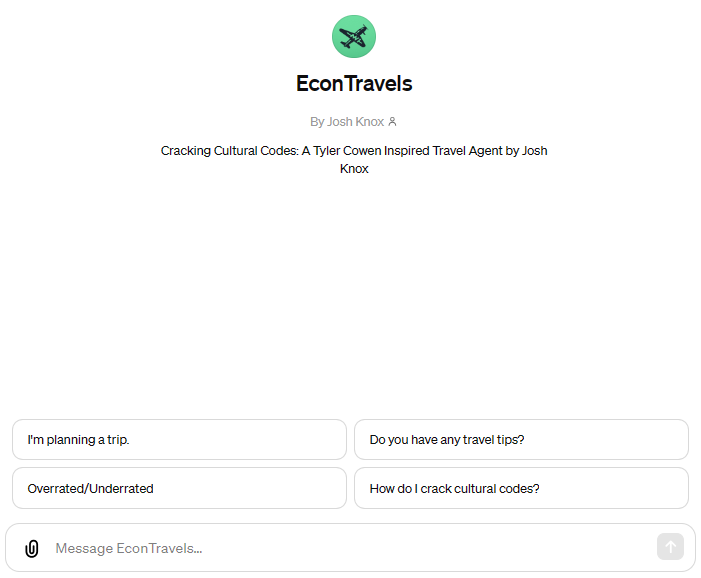
It’s still a work in progress, but if you’re planning a trip in the near future, I’d love it if you give my chatbot a try.
Words That Matter
Matter is a read-it-later app. I love it. You should download it. You’ll love it too.
Matter has become my alternative to mindlessly scrolling social media. I save essays into the app, then get rewarded with a reading queue of things that…Matter.
In the Matter App, you can follow favorite writers to discover new content. The Matter Company also created a set of standalone websites to surface great content through serendipity: Read Something Wonderful is a collection of high-quality essays. Listen to Something Wonderful is a collection of high-quality podcasts (did I mention the Matter App also transcribes podcasts?).
They also have a newsletter, Words That Matter, where each week a new celebrity curator shares 5-10 pieces of evergreen internet content they find meaningful or delightful.
The newsletter is great. It’s a look into people’s tastes and how their thoughts are shaped. It’s rabbit-holes of inspiration. It’s a fun way to learn about people.
More people should do this.
In that spirit…
Words That Matter, To Me:
Essays that shaped my thoughts around parenting and learning and education:
Hugging the X-Axis by David Perell
This is a love letter to commitment. It convinced me to take writing online seriously and join David’s Write of Passage course. It made me intentional about nurturing the multi-decade relationships I want in my life – especially with my wife and sons.
Growth without Goals by Patrick O’Shaughnessy
My dad has been retired for almost 20 years. Everyday, he consults a notecard with five activities. It’s not a todo list of ambitious goals, just habits to maintain: read, write, take a walk, practice chess, study a language. Get a little better each day.
I used to think this was cute in a dads-do-goofy-things sort of way. Patrick’s essay helped me appreciate the wisdom in my dad’s process. Chasing goals is a trap. Better to focus on cultivating the habits and practices that shape our lives. The rest will take care of itself.
School Is Not Enough by Simon Sarris
My oldest son is almost kindergarten age. This piece, and Simon’s other essays, have helped shape my thoughts around what school can and cannot provide for my kids – especially around recognizing and growing their own agency.
Childhoods of Exceptional People by Henrik Karlsson
Henrik is also someone I admire as a thought leader of intentional parenting. What lessons can we learn from the childhoods of exceptional people, and how can we apply them to our own parenting practice? Henrik identifies tutoring and apprenticeships, but also “curating a rich intellectual milieu”. So new question: how can I make space for my smart friends (who are much smarter than me) to meaningfully interact with my kids?
Here be Sermons by Kevin Simler
I bet sermons don’t work like you think they do. And I bet sermons are in more places than you think they are. At least, that’s what this essay did for me.
You Can’t Reach the Brain Through the Ears by Adam Mastroianni
Adam’s substack is wonderful. And he has quickly become my favorite EconTalk guest.
This is about how hard it is to communicate ideas, and also how easy it is to fool ourselves into thinking we are communicating ideas when we are not, and yet also how his grandma can end an email with “be good” communicate everything perfectly. If the piece taught me anything, it’s that I can’t do a good job explaining it…so you should probably just go read it yourself.
A Story About Tim Duncan by Shea Serrano
I love reading Shea Serrano for the way his voice pours through the page.
Shea’s sneaky about it, but this essay is really a list of things he was taught through example instead of words: show up, be a professional, take care of the people around you and they’ll take care of you. Reading it also makes me hungry for breakfast tacos.
Does My Son Know You? by Jonathan Tjarks
I cry every time I reread this. It is a beautiful, Christian witness.
Jonathan Tjarks, six months before he passed away, reflected on his terminal cancer diagnosis, his relationship with his own father who had passed away early, and his hope for the future of his family, including his 2-year-old son. “I didn’t need my dad’s money [when he died], but I could have used some of his friends,” echoes when I consider how to structure my own life as a parent.
DEMO: How to Train Your Custom GPT
Dad[AI]Base Creation Demo:
In this video, I configure a custom GPT to generate dad jokes. I demonstrate how prompting a custom GPT can enhance standard ChatGPT’s ability to generate and express humor.
It’s a simple premise…the main takeaway I want to give you is that this is actually very easy to configure. If you have an idea, it does not take a lot of special knowledge to build a prototype.
Dad[AI]Base Use Demo:
Want to test Dad[AI]Base’s humor yourself? Try it here!
Continue readingScreen Share or Schedule Meeting From Teams Group Chat
Fun fact: you can screen share or schedule a meeting from a Teams group chat.

It’s hidden in the ellipsis next to the add person icon.
I don’t think this was always the case.
There are multiple ways to talk with multiple people in Teams. You can create a Team. You can create a Channel. You can create a Private Channel. You can create a Shared Channel. You can embed a Whatsapp group chat as a website tab inside a Team created specifically for that purpose, where only you are a member.
The pros and cons of these can, and in fact does, fill a book (though the book doesn’t explore that last scenario in detail).
Group chats have fewer features than Teams, or channels within Teams, but sometimes a group chat is the best, lightweight tool for getting things done. It’s nice to know they’re good for quick communication and also easily enable sharing screens or organizing a meeting within the group if necessary.


~DALLE interpretations of this post.
Letters to a Young ERP Consultant
I wrote a book!

You can buy it here.
(or just send me an email if you want one and I’ll send you a free copy)
Word: Why Are Page Numbers Resetting in the Middle of My Document?
And How Do I Fix it?
Recently came across this issue while using a manuscript template (fancy!)
Sections
An advanced feature of word is you can carve your document into sections. Each section has it’s own page number sequence. These number sequences can be formatted to continue from the previous section, or start at any given number.
Using sections allows you to do fancy(!) page number things like use roman numerals in your pre-manuscript section and regular numerals in your regular manuscript section.
It is easier to see these sections if you enable show/hide paragraph marks (CTRL+*).
Format Page Numbers
To set the page number format, right click the page number in the desired section and click Format Page Numbers.
Example:

EconEats: An AI Dining Guide
I built an AI-Powered recommendation engine for delicious ethnic food.
If you have a Chat GPT Plus subscription, you can try it here.

Here’s how I made it:
Continue reading